
III. Artificial intelligence and the economy: implications for central banks


Leveraging Artificial Intelligence For Enhancing Security And Privacy In Modern Computing Systems
The rise of interconnected systems, cloud platforms and IoT devices has amplified security and privacy challenges. Cyberattacks, data breaches and privacy violations increasingly target governments, businesses and individuals. Traditional measures like firewalls, encryption and intrusion detection struggle to address the scale and sophistication of threats, necessitating innovative solutions. AI's pattern recognition, automation, and predictive capabilities make it a transformative force in cybersecurity and privacy preservation, offering solutions for detecting and mitigating threats before they occur.
This blog post explores AI's role in enhancing security and privacy. It examines modern challenges, AI-driven solutions and ethical considerations, while addressing the practical and regulatory implications of integrating AI into security frameworks.
Security and Privacy Challenges in Modern ComputingModern Security Threats: Cyberattacks have evolved into complex threats, including ransomware, phishing, malware and insider risks. Ransomware attacks disrupt critical systems, while phishing campaigns exploit social engineering to steal sensitive information. Insider threats remain problematic due to privileged system access.
Simultaneously, privacy concerns escalate as vast amounts of personal data are collected through social media, IoT devices and cloud platforms. Data breaches expose sensitive information, causing reputational and financial damages, along with misuse of personal data.
Limitations of Traditional Measures: Firewalls, cryptography and intrusion detection systems (IDS) have been foundational in cybersecurity. However, these reactive measures struggle with zero-day vulnerabilities and advanced persistent threats. Many rely on human intervention, slowing response times. Similarly, traditional privacy frameworks cannot handle the complexities of big data and globalized cloud environments.
Emerging Challenges with IoT and Cloud Computing: IoT devices, often minimally secured, expand attack surfaces, while cloud systems introduce concerns around jurisdiction, shared responsibility and misconfigurations. Big data analytics amplifies privacy risks despite regulatory frameworks like GDPR and CCPA. Traditional methods fall short, necessitating AI-driven solutions.
AI Applications in SecurityThreat Detection and Prevention: AI-driven security systems surpass traditional signature-based methods by employing machine learning to detect anomalies in behavior or network traffic. These systems identify unknown threats in real-time, mitigating risks like advanced persistent threats. AI-based IDS continuously learn and adapt to sophisticated attacks, enhancing proactive defenses.
Predictive Analytics: AI models analyze historical data to predict vulnerabilities, enabling preemptive mitigation. For example, AI-powered tools prioritize remediation for critical software vulnerabilities. Predictive insights on attack tactics allow organizations to enhance resilience and automate responses to low-level threats.
Fraud Detection: AI systems excel at identifying subtle fraud patterns in financial services, e-commerce, and healthcare. Machine learning models flag suspicious activities, such as unusual transaction patterns, protecting consumers and businesses. AI also combats fraudulent reviews and fake accounts in e-commerce.
AI for Privacy-Preserving SystemsDifferential Privacy: This technique integrates statistical noise into datasets, preserving anonymity while retaining utility. For instance, Apple uses differential privacy in iOS to collect aggregate user data securely. AI enhances this method by dynamically adjusting noise levels based on data sensitivity.
Federated Learning: By decentralizing data training, federated learning keeps sensitive information on local devices, reducing exposure risks. Google's Gboard keyboard employs this method to improve user suggestions without sharing raw data. Federated learning minimizes privacy risks in mobile and edge computing environments.
AI-Enhanced Encryption: AI optimizes encryption key management and access control, adapting dynamically to user behavior and data sensitivity. For example, AI systems detect abnormal access patterns, automatically tightening encryption to prevent breaches.
Challenges: Privacy-preserving AI faces challenges like model inversion attacks, where attackers reconstruct sensitive data from anonymized outputs. Balancing privacy with data utility remains complex, requiring innovative solutions.
Ethical Implications of AI in Security and PrivacyBias and Discrimination: AI models may perpetuate biases inherent in training data, leading to unfair outcomes in predictive policing or fraud detection. For example, facial recognition systems have higher error rates for women and people with darker skin tones. Mitigating bias requires diverse datasets, transparent evaluations and continuous monitoring.
Over-Surveillance Risks: AI-powered surveillance can erode privacy and civil liberties. Facial recognition and online monitoring tools risk creating a surveillance state. Adherence to regulations like GDPR is essential to ensure ethical deployment.
Governance and Regulation: AI governance frameworks must address transparency, accountability and fairness. International cooperation is necessary to regulate cross-border security and privacy challenges. Ethical guidelines should prioritize public accountability and ensure explainability in AI decisions.
Future Directions and ChallengesAI models employing deep learning and unsupervised learning can autonomously detect novel threats, while reinforcement learning optimizes defense strategies. Techniques like transfer learning improve adaptability across diverse security domains.
Homomorphic encryption and secure multi-party computation allow sensitive data analysis without exposure, advancing AI's privacy capabilities.
Adversarial attacks, which manipulate AI models to produce incorrect outputs, pose significant challenges. Robust training methods and adversarial-resistant algorithms are essential to mitigate these risks.
Issues like data quality, scalability, interpretability and regulatory gaps persist. Interdisciplinary collaboration is critical for addressing these challenges, ensuring ethical and effective AI deployment in security and privacy contexts.
Robust Governance NeededAI is transforming security and privacy, enabling proactive threat detection and privacy-preserving analytics. However, ethical concerns such as bias, over-surveillance and adversarial risks necessitate robust governance frameworks. Future research must tackle challenges in data quality, scalability and interdisciplinary integration to ensure AI enhances security while safeguarding individual rights. Through innovation and collaboration, AI can reshape secure and privacy-respecting computing systems, balancing societal values with technological advancement.
About the authorsKushal Walia is a Senior Product Manager Technical at Amazon Web Services, with extensive experience in artificial intelligence, cloud computing, serverless computing and distributed computing. He has developed deep expertise in enhancing the developer experience for AWS services, focusing on security, governance and fraud containment on serverless platforms. Kushal's technical leadership at AWS extends to building supply chain, logistics and people analytics solutions, using cutting-edge technologies like cloud computing, serverless computing and AI.
Karthik Mahalingam is an accomplished Technical Program Manager and engineering leader with over 15 years of experience in privacy, security engineering and AI governance across technology and financial services sectors. He currently leads privacy initiatives for Alexa Shopping and Rufus, LLM based AI assistants, in the Amazon app, ensuring the safety of over 100 million customers' data. An active contributor to the privacy and security community, Karthik mentors emerging professionals and shares industry insights through speaking engagements. He holds a Master's in Cybersecurity from Bellevue University and a Master of Philosophy in Computer Science, demonstrating his commitment to continuous learning and industry advancement.
Quantum Leap? This Computing System Could Advance In 2025.
The next big thing in tech is likely to be the current big thing in tech: artificial intelligence. But other technologies are also making gains. One that could become more prominent in the coming year is quantum computing.
It's pretty hard to explain quantum computing with brevity, but here goes. "Instead of bits — which are ones and zeros — a quantum computer also uses ones and zeros, but they can flip and be either a one or a zero at the same time," said futurist Amy Webb, CEO of the Future Today Institute.
Webb said that allows quantum computers to solve supercomplex equations that would take a regular computer septillions of years (septillion being a number with 24 zeros).
"It's kind of been the holy grail of the computing world," Webb said. "The problem is that these qubits are super-, superfragile."
Even slight mechanical vibrations cause qubits, or quantum bits, to make computation errors. But recently, advances in error correction have brought accurate quantum computing closer to reality — like a new processor Google unveiled this month called Willow.
The announcement has spurred a rush of excitement in the financial markets, according to Dan Ives, a tech industry analyst at Wedbush Securities.
"Because I think investors have realized, with AI, ultimately what could happen," he said, "and everyone's trying to find the next, call it 'mini-Nvidia.'"
Nvidia is the AI boom's leading chipmaker and has generated gargantuan returns for investors.
Both technologies promise to help solve some of the world's most difficult problems by, for instance, accelerating drug development, bioengineering and climate change solutions.
But unlike AI, regular people aren't likely to see the effects of quantum computing in their lives immediately, per Daniel Newman, CEO of Futurum Group.
"I think we're talking, you know, five years at the earliest. Ten years is probably a more realistic time horizon," he said.
On the time scale of septillions of years, though, that's right around the corner.
There's a lot happening in the world. Through it all, Marketplace is here for you.
You rely on Marketplace to break down the world's events and tell you how it affects you in a fact-based, approachable way. We rely on your financial support to keep making that possible.
Your donation today powers the independent journalism that you rely on. For just $5/month, you can help sustain Marketplace so we can keep reporting on the things that matter to you.
Everything You Can Do With Microsoft's Copilot AI Assistant On Windows
We may earn revenue from the products available on this page and participate in affiliate programs. Learn more ›
It's impossible to ignore the rapid rise in the capabilities of artificial intelligence tools in recent months. Microsoft hasn't been shy in stuffing Windows full of AI features: Windows computers now come with a dedicated key for launching Copilot, Microsoft's AI assistant, which has been integrated into the operating system.
We'll guide you through everything you can use Copilot for on your Windows laptop or desktop, and how you can get it up and running. We'll also explain the difference between Copilot and a Copilot+ PC, which is a label you might have spotted if you've been shopping for a Windows computer lately.
Copilot on WindowsWhen it comes to the Copilot assistant inside Windows, it's very similar to the Copilot app on the web. You can jump between the web app and the app in Windows, using the same Microsoft account, and carry on where you left off. Your chat history should also be synced between Windows and the web.
Get the Popular Science newsletterBreakthroughs, discoveries, and DIY tips sent every weekday.
By signing up you agree to our Terms of Service and Privacy Policy.
There are a number of ways to launch Copilot on Windows. You can launch it from the Start menu like any other program: Just search for it or find it in the main apps list. You might also find WIndows has pinned it to the taskbar. Copilot can also be launched by pressing the Copilot key on your keyboard (two curved rectangles next to each other), if you've got a newer PC with the key included.
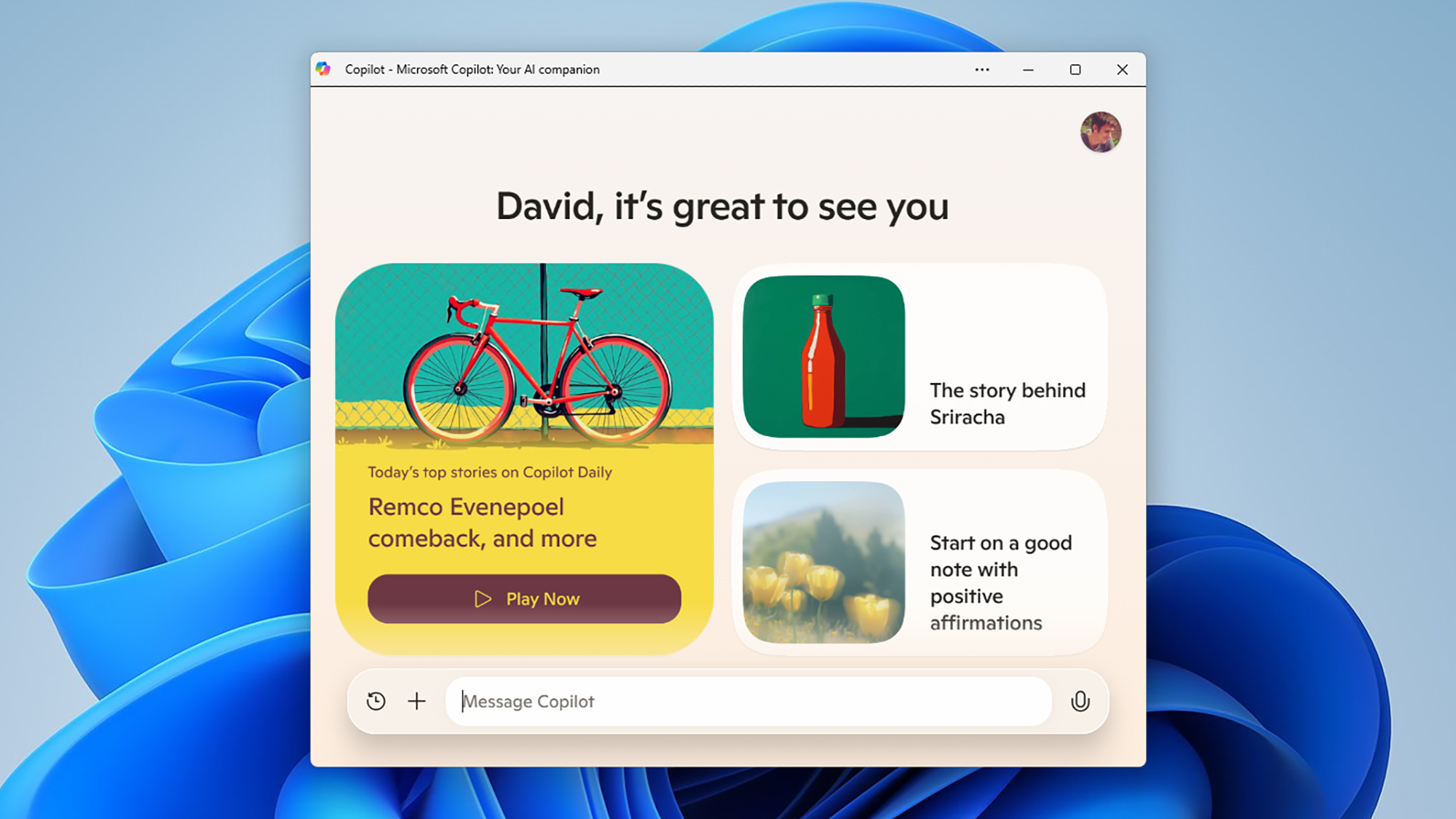 Copilot gives you some ideas for getting started. Screenshot: Microsoft
 Once you're into Copilot, you can sign in with your Microsoft account, and start chatting. You'll see some suggestions for conversation topics: daily news, motivation or meditation tricks, or prompts for a short story, as examples. Just type in the Message Copilot box to get started, or click the microphone icon to the right, if you'd rather talk instead. Bear in mind that your chats are still saved when you quit the app and open it up again (click the clock icon to see your chat history).
You can ask Copilot questions (like how DNA works or when Brazil became a country), get it to generate text for everything from emails to poems, and use it for advice too—with the usual caveats about AI hallucinations. It's always worth double-checking what AI tells you, though you will notice that for some answers you'll get references back to the web, so you can verify the accuracy of the information.
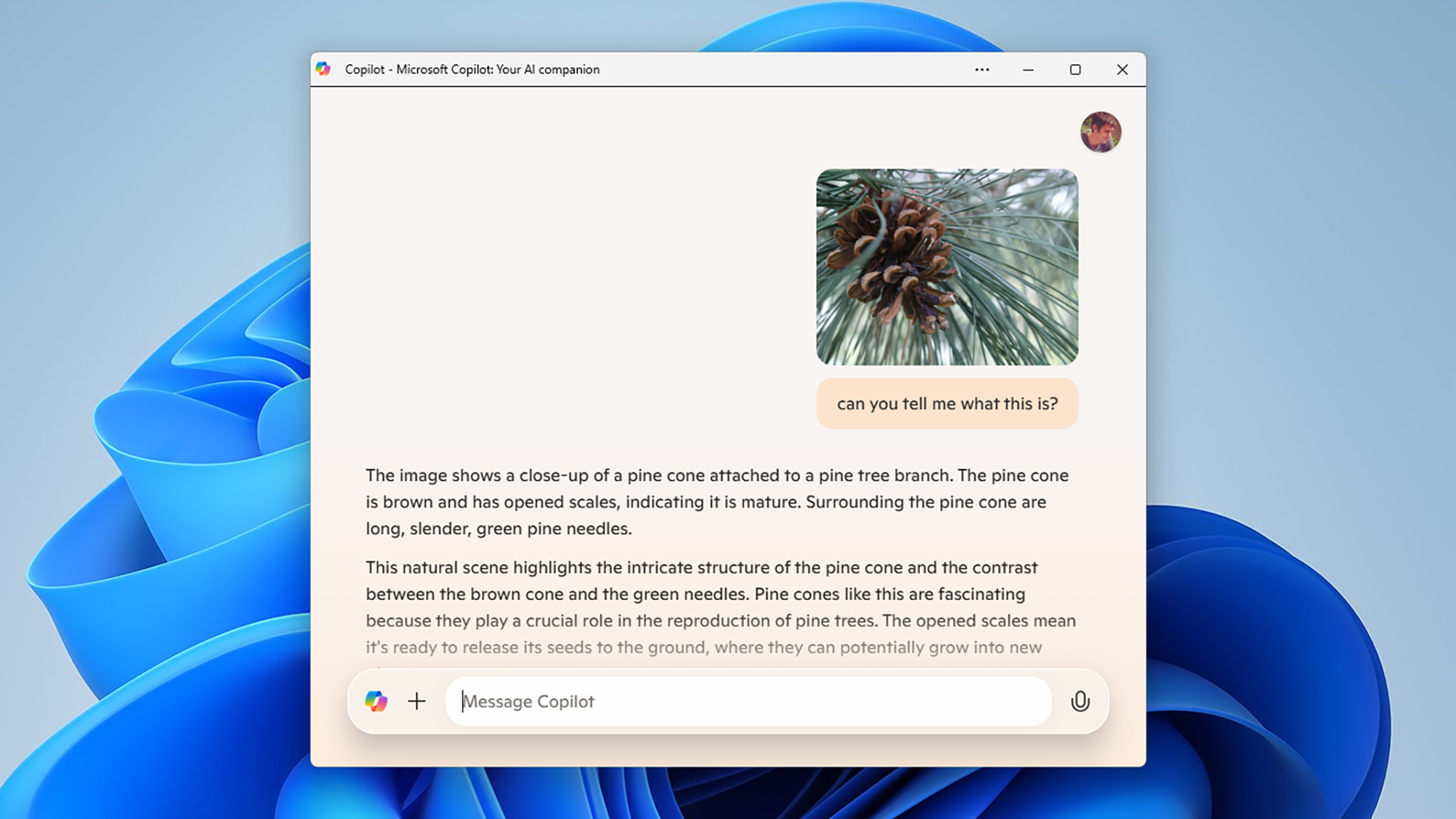 Copilot can work with images as well. Screenshot: Microsoft
 Copilot can be useful in the same way that AI chatbots like ChatGPT and Gemini can be. You can ask about how to boost your confidence, for example, or how to do something on Windows, or how to best wrap an oddly shaped present. Click the + (plus) button to the left of the input box, and you can start a new chat or upload an image to use with Copilot. You can ask about the contents of an image, or use them as prompts (so something like "give me a recipe with this ingredient").
You're also able to create your own AI art with Copilot—just ask it to draw something or create an image of something. As with other similar AI tools, the more specific you are about what you want to see and its style, the more likely you are to get something close to what you wanted. Each image comes with a download button next to it (the downward arrow), so you can save it somewhere else.
Using Copilot+ PCsYou may have noticed you can now buy Windows laptops that are classed as Copilot+ PCs too. Rather confusingly, these don't have a different version of Copilot installed, but they do have a specific bit of hardware inside: A neural processing unit (NPU), which means more AI processing can be done faster on the actual device, without having to transfer data to and from the cloud.
You can get Copilot on Windows 11 whether or not you have a Copilot+ PC in front of you, and you'll be able to access all of the features mentioned above. There are some extra features that a Copilot+ PC gives you, including Windows Studio Effects, which lets you add AI-powered visual enhancements to your video calls.
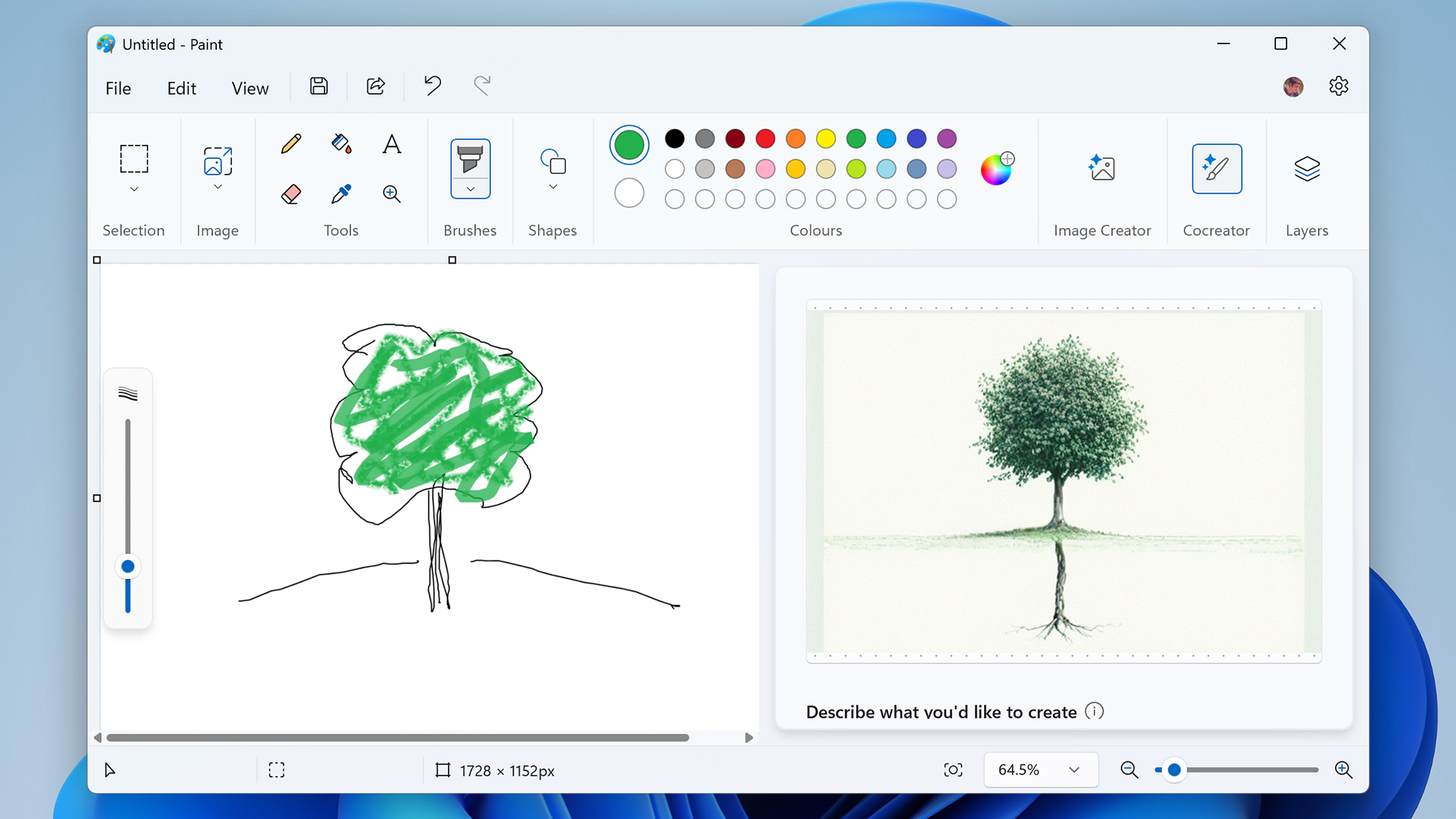 Use AI to enhance your Paint pictures. Screenshot: Microsoft
 Another additional feature is something called Cocreator in Paint. Load up the application, use a text prompt to describe what you'd like a picture of, and then start drawing: The Cocreator AI will soup up your scribblings so they enhance what you've already done. Just click Cocreator in the toolbar at the top to get started.
Then there's Windows Recall, though this is only in testing for early adopters at the moment. It takes snapshots over time of what you're doing on your PC—snapshots that are kept local and encrypted—and then lets you search back through them to find a file, webpage, idea, or whatever else. It makes it easier to get back to something you've previously been working on.
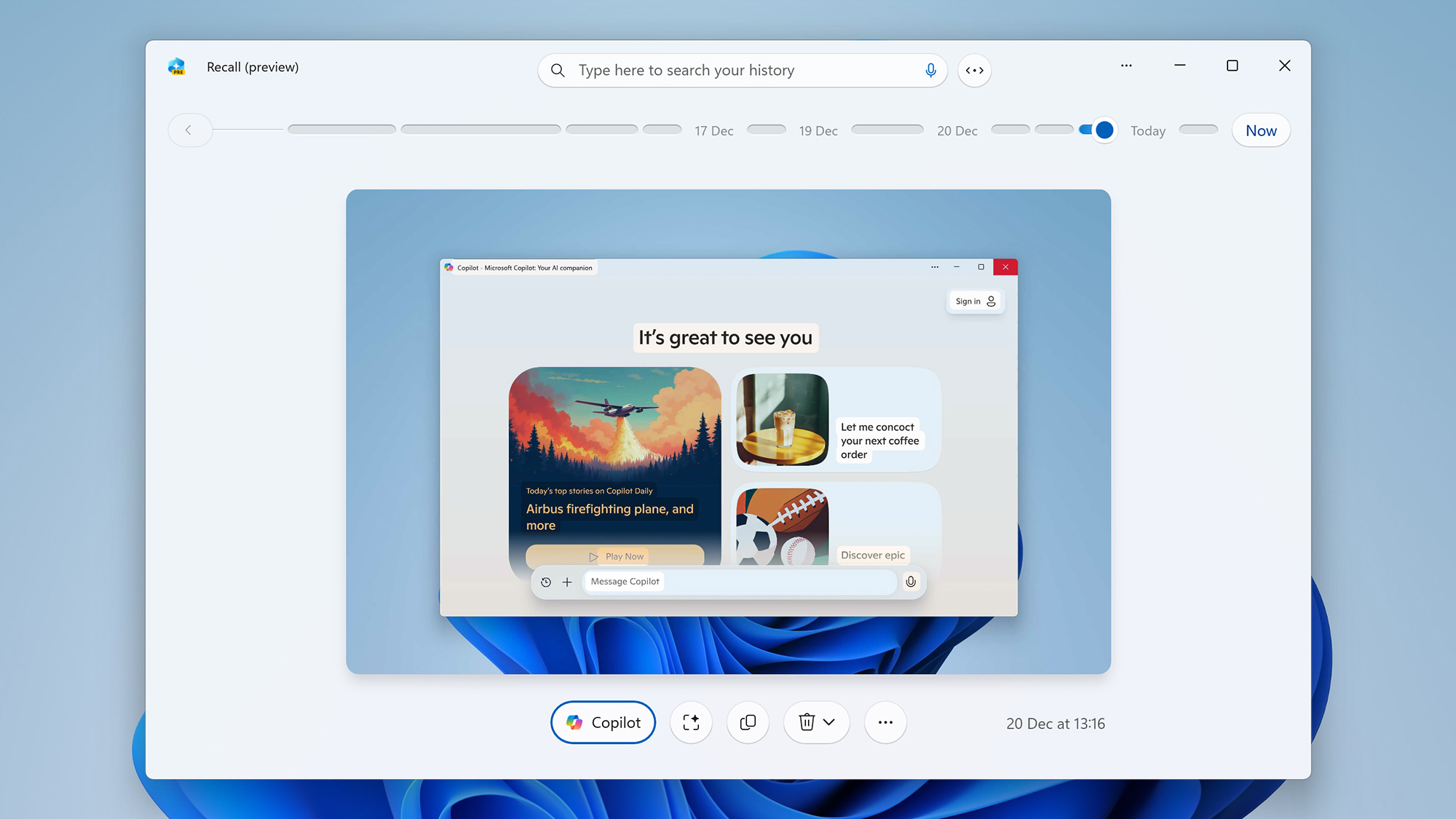 Recall helps you go back in time on your PC. Screenshot: Microsoft
 If you're part of the Windows Insider program, Recall is available as a preinstalled app. Once it's up and running, you can load it from the Start menu or taskbar, and see a timeline of screenshots going back from the current point. You can browse these images manually, or search for something specific (so searching for "Popular Science," for example, would bring up all the times you were looking at the Popular Science website).
Copilot+ PCs also give you Automatic Super Resolution, which can tweak screen resolution during gaming to improve quality, and Live Translate, which translates any audio on your computer in real time. There's also a Cocreator-like tool in Photos, that lets you reimagine existing images in different styles or with different elements.
Win the Holidays with PopSci's Gift GuidesShopping for, well, anyone? The PopSci team's holiday gift recommendations mean you'll never need to buy another last-minute gift card.



Comments
Post a Comment